Region is the one Valorant setting people ignore until it bites them — usually right after they've bought an account that turns out to live on a server half a world away. A few minutes understanding how shards work saves you from high ping and lost progress.
Key Takeaways
- Valorant runs on separate regional shards: NA, LATAM, BR, EU, KR, and AP (with dedicated servers serving areas like the Middle East within them).
- Your Region of Residence sets your store currency, your legal agreements, and — most importantly — the matchmaking pool you play in.
- Players on different shards cannot queue together, so your friends' region matters as much as your own.
- You can pick a specific server inside your shard (for example Frankfurt vs. London in EU) to lower ping, but that is different from changing shards.
- Changing your Region of Residence across most shards wipes your ranked progress and history, which is why buying an account already on your region is the safer choice.
What are the Valorant regions?
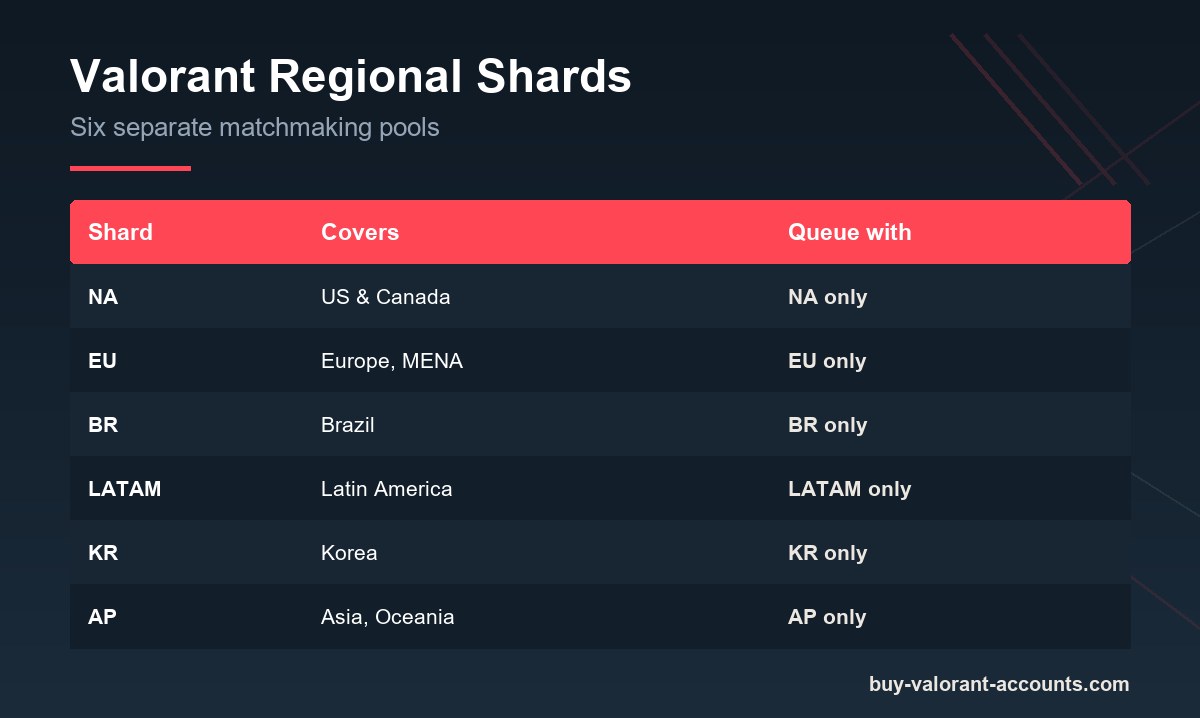
Valorant divides its player base into six regional shards: North America (NA), Latin America (LATAM), Brazil (BR), Europe (EU), Korea (KR), and Asia Pacific (AP). Each shard is an isolated pool of players with its own servers, leaderboards, and store.
Within a shard, Riot runs multiple physical server locations. EU players, for instance, can route to Frankfurt, London, Warsaw, or Paris, while AP players choose between hubs like Tokyo and Singapore. Areas such as the Middle East and North Africa are served by nearby servers rather than forming a separate competitive shard.
Why does your Valorant region matter?
Your region controls three things that shape every session:
- Who you play with and against. Matchmaking only pairs you with others on the same shard. An account on the wrong shard means you'll never queue with local friends.
- Ping. Distance to the server drives latency. A NA account played from Europe will feel sluggish no matter how good your connection is.
- Store and pricing. Your Region of Residence sets your currency and the prices you see for the in-game store and battle pass.
Because of that first point, matching your account's region to where you actually live — and where your duo partners play — is essential. When you're weighing up the accounts listed on this site, filter by your shard first and rank second; a great-looking account on the wrong server is a frustrating buy.
Can you change your Valorant region?
There are two different things people mean by "changing region," and only one is painless.
Switching servers within your shard is easy and built into the game — you just pick a lower-ping server before you queue. Changing your Region of Residence (moving to a different shard entirely) is a bigger deal. Riot ties it to your physical location, and for most shard-to-shard moves it resets your current ranked season, match history, and purchase history. Transfers between the NA, LATAM, and BR shards are the notable exception where more of your data carries over.
The practical takeaway: don't buy an account on a distant shard planning to "just transfer it later." You'd likely lose the rank you paid for.
Which region should you buy a Valorant account in?
Buy the shard you physically play on. That gives you the lowest ping, lets you queue with local friends, and avoids the progress-wiping transfer problem entirely.
| If you play from… | Buy an account on… |
|---|---|
| United States / Canada | NA |
| Europe, Middle East, North Africa | EU |
| Brazil | BR |
| Spanish-speaking Latin America | LATAM |
| Korea | KR |
| Asia, Oceania | AP |
If you split time between regions, prioritize where you play ranked most, since that's where ping and matchmaking quality matter the most.
Frequently Asked Questions
How many regions does Valorant have?
Valorant has six competitive shards: NA, LATAM, BR, EU, KR, and AP. Each has its own servers, matchmaking pool, and store.
Can I play with friends in another region?
Not in the same match. Matchmaking is limited to a single shard, so you and your friends need accounts on the same region to queue together.
Does changing my Valorant region delete my rank?
For most shard changes, yes — it resets your current ranked season, match history, and purchase history. Transfers among the NA, LATAM, and BR shards keep more of your data, but treat progress loss as the default.
What's the difference between a server and a shard?
A shard is your regional pool (like EU or NA). A server is a specific data center inside that shard (like Frankfurt or London) that you can pick to reduce ping.
Should I buy an account from a different region if it's cheaper?
Usually not. Lower price rarely offsets high ping, being unable to play with local friends, and the risk of losing progress if you try to transfer it. Buy your own shard.